Showing posts with label Access. Show all posts

Monday, 18 February 2013

TreeViews -- A Powerful Yet Simple Alternative


Treeviews – A Powerful  Alternative
I have written previously on using the TreeView within Access (Using TreeViews). There are a number of good reasons to use TreeViews – perhaps highest among them is that they are everywhere within the Windows UI, with the result that virtually everyone knows how to use them.

TreeViews are not especially easy to program. Further, they have a number of limitations. However, I have stumbled upon a powerful alternative that delivers an interface much more to my liking. Not only that: it’s very powerful and flexible, and delivers precisely the amount of control that I want. Best of all, it’s dead-simple to create – so simple, in fact, that I wonder why it took me so long to think of it.
The following example was developed in Access 2007 and will work in later versions. I have not tested it in previous versions.

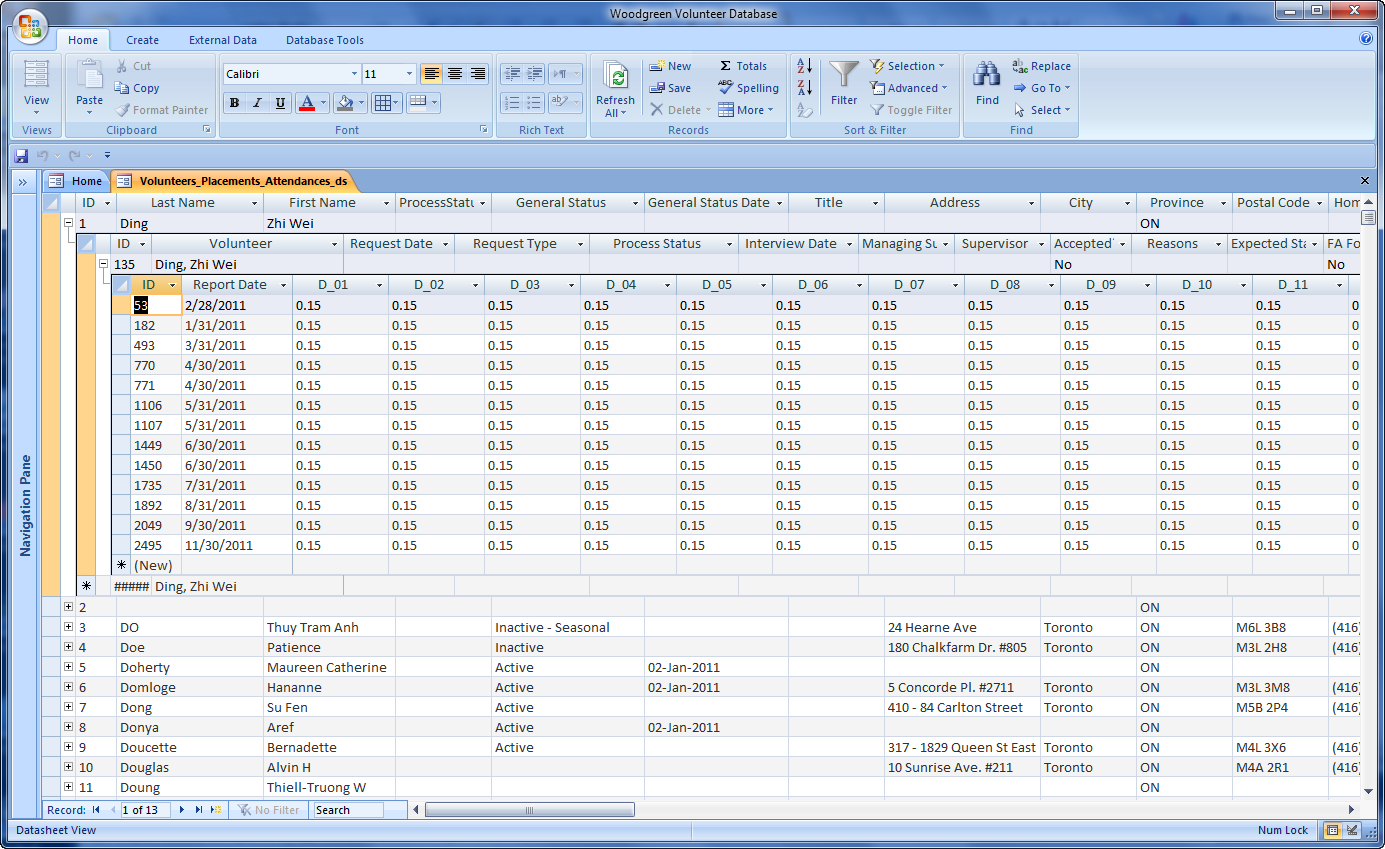
Figure 1: Three-Level "TreeView"

This looks a lot like a formless browse of the parent table. Access does this automatically when you have defined relationships among your tables. However, it happens automatically only when any given parent table has exactly one child table. When two or more child tables exist, Access can’t determine which one to use, and therefore prompts you for the table to use. And unfortunately, once you've made that decision, you're stuck with it: every time you open the parent table, you get the same child you originally selected. 

Although Figure 1 looks a lot like a formless browse, it is actually a series of forms created in DataSheet style, then nested. If you wish, you can even create normal forms for each level, and open them on double-click anywhere within the row of interest. (In this app, I did not do that, because the target users are all very comfortable in Excel, and used to the "spreadsheet" format depicted above.)

By using DataSheet forms rather than simple table-browses, you get complete control  over columns, events, validations, lookups and so on that are available in a form. In this example, I chose to freeze the first two or three columns at each level, so the user never loses track of which row is active.

To create such a “treeview” form, follow these steps:
1. Decide the hierarchy of tables or queries you want to display.
2. Starting at the bottom of the tree, create a datasheet form for each level. This command is hidden a little bit on the Create ribbon. Figure 2 shows where it is.


Figure 2: Create a DataSheet form.
3. Starting one level above the bottom, add a subform. In this example, we create three DataSheet forms and save them. (Call them DS1, DS2 and DS3.) Then we add a subform to DS2 , selecting DS3 as the subform to add. Then we add a subform to DS1, selecting DS2 as the subform. Presto! Your hierarchical form is ready to go.
4. Customize each form to suit your requirements. Write code for events, add validations, combo-boxes. Do everything you would do to a standard form that displays only one record at a time. Decide whether it would be useful to freeze one or more of the columns.


That’s all there is to this simple trick. When I presented the app to the users, they were wowed. With their approval, I used this technique throughout the whole app, wherever hierarchies were involved.


Tuesday, 13 November 2012

What to know before hiring professional Access developers

My Australian friends at Access Guru liked my post about "The Access Developer's Dilemma", and asked what I thought about the process of hiring Access developers. I thought that I'd share my response here.


One of the real strengths of Access as a development platform is that in the hands of a capable soloist, it can handle projects that, developed in another environment such as C#, would require require a team of developers as well as considerably more time. This is not to say that such development tools are overkill; they most certainly are not. It comes down to some combination of target market, development schedule,  developer skills available, budget and so on. That said, Access is an excellent vehicle for developing a wide variety of applications.

As the old saying goes, there are three types of developer: those who can count and those who can’t. In this context, I’m dividing Access developers into two camps: soloists and accompanists.

Soloists are one-person shops; they design the database, the User Interface more often than not, the release schedule (as opposed to the project’s deadline), the testing procedure if any, the on-line help if any, and the documentation (user and system), if any. As you can see, as we step through the list, the phrase “if any” recurs frequently. This is typically due to one or both of two facts: a) project size, and b) budget available. A soloist almost by definition works on bite-size projects, most often for small businesses and occasionally for much larger organizations such as government ministries, which in my experience might have a dozen projects on the go at once, outsourcing each of them to a soloist, thus mitigating the risk that all dozen projects fail; it is to be expected that one or two will either miss their budget or their deadline, or fail completely. A soloist project might take anywhere from a few weeks to a few months to develop and release; seldom longer. But the point is, such a project is of a size that a single developer can manage. 

Accompanists have typically never run a project, and often know they are not ready for that level of responsibility. Their work experience is often in large corporate or governmental organizations, and the project size mandates both a larger timeline and a team of developers, one of whom takes the lead. This sort of project might take, say, 5000 person-hours to complete.

As the person in charge of hiring, you will know at once whether you are looking for a soloist or an accompanist. It’s not that one is “better” than the other. To think so is to miss the point, and let me try to explain why.

A soloist does everything herself. To put it another way, she is a team player only when forced to become one, typically due to lack of an immediately next client – in which situation, hard-pressed to cover next month’s expenses, she begins scanning the career sites and flinging CVs into the cybersphere.

An accompanist is first and foremost a team player. She knows that he cannot perform some or all of the tasks masterfully, yet is confident that she can provide a meaningful contribution to some aspect of the big picture. She wants to learn from the experience of the team members. Negatively stated, she wants to be shielded from full responsibility for the failure of the project. More positively stated, she wants the opportunity to surround herself with more experienced people, and is eager to learn. From the hirer’s viewpoint, she is willing to work lots of unpaid hours for the opportunity to learn and grow.

Any given project may be divided into three chunks:
a)      Hard – designing the database and the overall user interface (UI); this might be two separate roles, and in large projects, most often is. DB designers are seldom gifted at UI design. There is a huge benefit in separating these roles: the strength of the DB design can be combined with the strength of the UI, and even better, the UI can be revised and enhanced without touching the rest of the project.
b)      Medium – implementing the required queries that will support the forms and reports. This requires the ability to understand database diagrams, know all about the relative merits of various join types (and in the case of a SQL back end, the subtleties of calling stored procedures versus views, etc.).
c)      Easy – creating basic forms and reports, based on queries that have already removed the heavy lifting from the task.

A well-assembled team will consist of one or two members of each class. Follow the chain. The DB Designer figures out all the Normal-Form stuff and how deep to go with it (3NF, 4NF, BCNF, 5NF)[1]. The second aspect of this, which may or may not involve a second team member, is to design the overall UE. I am the first to admit that I would prefer that someone else design the UI. I can deliver basic UIs that work, but if you’re looking for elegant layouts, l need help.

When considering assembling a team, it’s useful to bear in mind Brooks’s Law[2]: The more programmers you throw at a problem, the longer it will take to solve. This is neither maxim nor theory; it is fact, borne out in thousands of projects worldwide, on everything from mainframes to PCs. The manager is thus caught between two pincers (which I might suggest is the definition of that position): Job A is to listen to your underlings’ estimates and shave them down; Job B is to fudge up those estimates and fatten the project’s schedule, explaining to your superiors why it will take so long, all the while knowing they will shave you back (hence the original fattening).

So. We have soloists and accompanists, and you need to know which you’re seeking. I avoided the word “classes” because neither is “better” than the other, in the same sense as neither a cow or a goat is better than the other – both produce milk and ultimately meat – everything depends on the environment.

Know which you need. If you need a soloist, fine. In that case, prior experience in the business domain of interest may be paramount. If you need an accompanist, other factors come into play; as I tried to describe, there are levels, and when dividing the Big Picture into Smaller Pictures, you need to be aware of which aspects can be handled by developers with which levels of experience. Don’t try to hire a crew of experts; not only will egos get in your way, but you’ll be overpaying somebody for doing easy work.

The worst mistake you could make is to try to assemble a team from a group of soloists. Egos, programming styles, and a dozen other things as trivial as one’s ability to carry a conversation at the coffee-making machine, will come into play.


[1] There’s lots of information on-line about these refinements. If you need more info, visit www.artfulsoftware.com.
[2] “The Mythical Man Month” by Frederick J. Brooks, is an absolutely essential read for any professional developer, regardless of programming language(s) chosen.

Tuesday, 4 September 2012

Hiring Skilled Developers

This is a portion of a conversation between two of my cherished internet friends and fellow travellers, both gifted programmers. I thought that it might be interesting to the more general populace, rather than just the narrow world of Access developers. So here it is, in chronological order. I should emphasize that I deem both Martin and John most esteemed and respected colleagues, I've met John only once, but liked him immensely. I've never met Martin in the physical universe, but we have been communicating for several years, and I even got a credit in one of his books.

From: jwcolby

Sent: 04/09/2012 18:54
To: Access Developers discussion and problem solving
Subject: [AccessD] Access skills testing

Does anyone have anything on testing MS Access skills?

One of my clients wants to see what his applicants know.

--
John W. Colby
Colby ConsultingOn Tue, Sep 4, 2012 at 2:11 PM, Martin Reid <mwp.reid@qub.ac.uk> wrote:
They have a Colby, why do they need anything else?

Martin

Sent from my Windows Phone
________________________________

That's a moving target if ever I've seen one. Consider 2003 v. 2007-10. However, it's true that at least some of the knowledge of old commands is portable. But I sense another problem here, and that would be that this question is asked in the absence of app-requirements, which I don't think is fair either to the applicants or to the client. 

Instead I might suggest that a description of the app-requirements might first be formulated, and then the questions to ask might just "fall out" of the requirements. For example, is the BE to be SQL Server or MDB or Accdb? That question alone matters hugely, and influences all subsequent questions, on that path at least. Then there would be the issue of user-quantity: 100 users is significantly different than 10. Another consideration is the quantity of locations: if it's only one, things become much simpler. If it's several, then other skills are required, such as the ability to set up a Terminal Services server and establish the connections to same. After that I would want to know the demands involve Office Automation, such as populating Excel spreadsheets or Word documents from data inhaled from the database, and whether such documents require translation to Acrobat files to be automatically emailed to Outlook recipients or perhaps some other email client.

IMO, without answers to these questions, I could not begin to devise a set of test questions to determine whether candidate A or B or C would be a good fit. 

And there are several more questions, having more to do with the client's environment that the actual skill set. Does everyone wear ties, or shorts and tees? Are there rigid restrictions on start-and-stop time, or is the developer free to work her own hours? Are time zones involved (which might happen if the client does business in Asia)? How much technology-transfer is considered part of the gig (which means, do I not only have to write the app but also provide sufficient instruction for the in-house people to be able to perform maintenance)?

I can probably come up with a few dozen more questions, but the bottom line is, before we can proceed we need to understand the client's opinion about what defines a successful hire, and that means that we need to know the requirements of the app itself. Without this information, you and I and the client are in the dark, asking abstract questions such as "Do you know how to open the same form thrice?" or perhaps, "Can you write a class that abstracts the details of an argument to the OpenForm method", which questions, I daresay, do not begin to approach the immediate problems at hand. If there is no possibility in the given app to be written that a user will ever open the same form twice, why ask the question? On the other hand, if a given report must be able to accept a date-scope and/or a client scope, then that question is definitely worth asking: "How would you suggest that we accomplish this, and secondly, will your solution be portable from app to app?" In this case, that's how I would phrase the question.

There's one more thing that I feel that I should toss into this discussion: although I started out in dBASE-II and then Fox and then Access and then Oracle and then SQL Server, one thing I learned way back when is that the user should NEVER NEVER NEVER have access to the native tables. No No No! (If I'm sounding like Adele, I can live with that!) Nobody but God, which means the DBA, should be able to access a table, and if you have not accepted that fundamental truth, then go back to school and learn why. I learned from Dr. E.F. Cood and Fabian Pascal and Michale Stonebreaker, and also a few set-theory mathematicians, and after them, a few of the NoSQL people. Life goes on, and so does exploration of where this is going to get us, in the big picture. I admit that considering these giant brains, I am a follower, not a leader, But I also say that I walk into these arguments without baggage. I am looking for two things: correctness and speed. That's all I have to say about my decisions in this respect: at any given moment, I could be wrong and chosen the wrong horse. I accept that. But I have no favourite horses in this particular Kentucky Derby. I might have a favourite and might bet an unhealthy amount of loot on that gorgeous horse, but that doesn't mean that if another horse wins, I shall call the raced fixed. That's not where I go with this stuff. I have my emotional favourites -- of course I do! But that doesn't mean that I reject Evidence. Above all, I try to be objective in these matters, and if the evidence turns against me, I shall most happy to declare that I was mistaken. I am not out to win arguments, in the face of evidence. I am most willing to be proved incorrect. That is my nature.

On Tue, Sep 4, 2012 at 2:11 PM, Martin Reid <mwp.reid@qub.ac.uk> wrote:
They have a Colby, why do they need anything else?

Martin

Sent from my Windows Phone
________________________________
From: jwcolby
Sent: 04/09/2012 18:54
To: Access Developers discussion and problem solving
Subject: [AccessD] Access skills testing

Does anyone have anything on testing MS Access skills?

One of my clients wants to see what his applicants know.

--
John W. Colby
Colby Consulting

Reality is what refuses to go away
when you do not believe in it

--
AccessD mailing list
AccessD@databaseadvisors.com
http://databaseadvisors.com/mailman/listinfo/accessd
Website: http://www.databaseadvisors.com
--
AccessD mailing list
AccessD@databaseadvisors.com
http://databaseadvisors.com/mailman/listinfo/accessd
Website: http://www.databaseadvisors.com


--
Arthur
Cell: 647.710.1314

Prediction is difficult, especially of the future.
  -- Niels Bohr